 ChatGPT
 Perplexity
 Grok
 Google AI
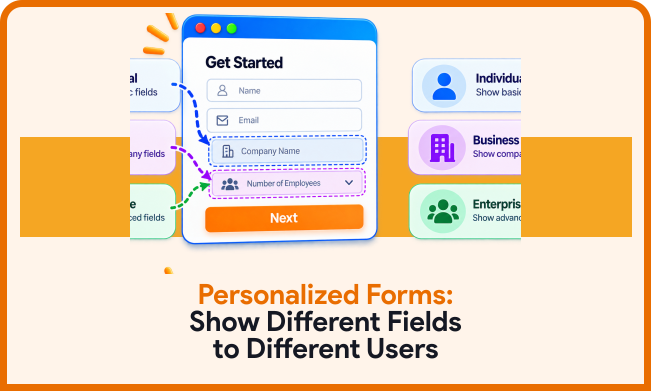
Not every visitor needs to answer the same questions. Showing identical fields can create unnecessary effort. It can also make forms feel longer than they need to be. Personalised web forms provide a smarter alternative. They adapt questions according to each visitor’s responses.
This approach creates a more relevant form experience. Visitors only see questions that apply to them. Businesses can still collect important information efficiently. This makes smart forms useful for modern lead capture. The result is a cleaner, more focused journey.
What Are Personalised Web Forms?
Personalised web forms adapt their questions for different visitors. The form changes based on the information already provided. One visitor may see additional questions. Another visitor may see completely different fields.
This approach uses conditional logic and dynamic fields. The form responds to user selections as they complete it. It avoids displaying irrelevant questions to everyone. That can make complex forms easier to complete. It can also support more targeted lead capture.

How Do Personalised Forms Work?
Personalised forms use rules behind the form experience. These rules determine which fields appear next. A visitor’s response activates specific questions. Other questions can remain hidden until later in the process.
For example, a business may ask about services. Selecting one service can reveal related questions. Selecting another service can display different fields. This creates a more relevant user journey. It also helps businesses collect more useful information.
Why Show Different Fields To Different Users?
Every visitor arrives with different needs and expectations. Asking identical questions can create unnecessary friction. Some questions may not be relevant to certain visitors. Personalisation helps remove those unnecessary interactions.
Showing relevant fields can make forms feel simpler. Visitors can focus on information that matters. Businesses can still collect detailed information when needed. This creates a better balance between simplicity and qualification.
Reduce Unnecessary Questions
Long forms can discourage visitors from completing them. Too many visible questions can make forms feel demanding. Conditional fields reduce that initial visual complexity. Visitors see only questions relevant to them. This can make complicated forms feel much shorter. It also keeps attention focused on current questions.
Improve Information Relevance
Generic forms often collect unnecessary information. Personalised fields can make questions more specific. Visitors receive questions related to their selections. Their answers can therefore become more useful. Relevant questions can also improve lead qualification. Sales teams receive information connected with customer needs.
Conditional Logic Forms Explained
Conditional logic forms use rules to control what visitors see. These rules respond to specific visitor selections. A field can appear after a particular answer. Another field can remain hidden for different answers.
For example, a form can ask about business type. Choosing “agency” can reveal agency-specific questions. Choosing “freelancer” can show different questions instead. This makes one form useful for several audiences.
Show Fields Based On Answers
The simplest approach uses previous answers as triggers. Each answer can activate relevant dynamic form fields. Visitors therefore move through different form paths. The experience changes without requiring separate forms. This can help businesses serve multiple customer groups. It also keeps information collection within one workflow.
Create Different Form Paths
Conditional rules can create multiple paths within one form. Each path can collect specific information. This works well for varied services or audiences. Different paths can also support better qualification. A visitor’s choices determine the questions they receive. This creates a more personalised user experience.
Smart Forms For Better Lead Capture
Smart forms can make lead capture more responsive. They adjust based on the information already provided. This reduces the need for separate forms. It can also support more detailed qualification.
The benefit comes from relevance, not complexity. Visitors should not feel like they are completing complicated software. The experience should remain clear and predictable. Smart forms should simplify the journey, not complicate it.
Capture More Relevant Information
Relevant questions can reveal important customer requirements. Businesses can ask about specific needs and preferences. They can also collect information about project requirements. This supports targeted lead capture across different audiences. Sales teams receive more context with each submission. That context can make follow-up more useful.
Keep Forms Easier To Complete
Personalisation can reduce the number of visible questions. Visitors focus only on relevant fields. This can make lengthy information requirements feel lighter. A simpler experience can encourage more complete submissions. Visitors are less likely to face irrelevant questions. Businesses still receive information required for qualification.
Personalised Forms And User Experience
Forms are part of the overall website experience. Their design can influence how visitors perceive a business. Repetitive or irrelevant questions can create frustration. Personalised forms can create a more considerate experience.
Visitors can feel more understood when questions remain relevant. The form appears responsive to their choices. This can create a smoother interaction from start to finish. A personalised user experience can support stronger engagement.
Personalised Web Forms For Different Audiences
Businesses often serve multiple customer groups. Each group may need different information to convert. A single static form may not suit everyone equally.
Personalised web forms can address these differences. Businesses can create one flexible form experience. Different visitors then follow different question paths. This reduces duplication while supporting audience-specific information.
B2B And B2C Visitors
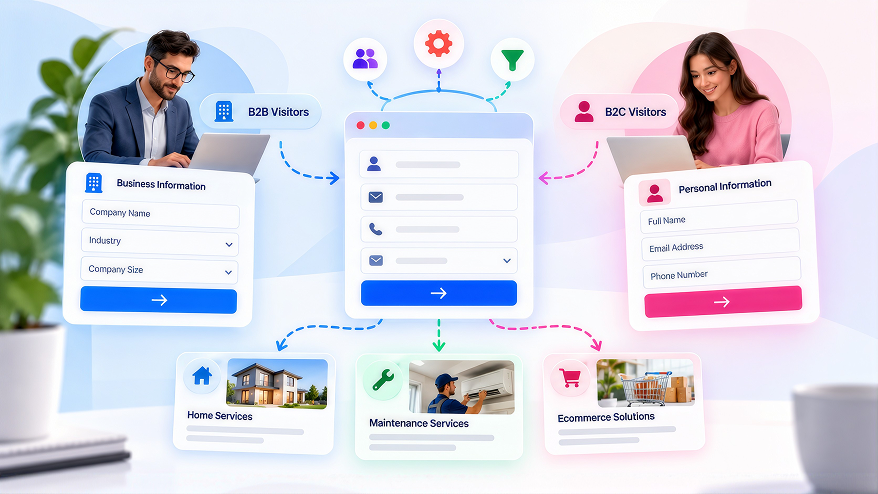
B2B visitors may need business-related questions. B2C visitors may need more personal information. Showing both sets together creates unnecessary complexity. Conditional logic can separate these experiences. Visitors select their customer type first. Relevant questions then appear automatically.
Different Service Requirements
Businesses offering multiple services face similar challenges. Each service may require different information. Showing every question to everyone creates unnecessary effort. Personalised fields solve this problem through conditional paths. Selecting a service reveals its related questions. Other service fields remain hidden.
Personalised Forms For Targeted Lead Capture
Targeted lead capture focuses on collecting useful information. The objective is not simply generating more submissions. Businesses also need information supporting meaningful follow-up.
Personalised fields can improve this process. Questions can reflect visitor choices and requirements. This helps businesses understand each lead more clearly. It can also support better segmentation after submission.
Qualify Leads During Completion
Lead qualification can happen while visitors complete forms. Relevant questions can identify needs and priorities. Businesses can then understand potential opportunities earlier. Qualification should match visitor intent. Asking too many questions can create unnecessary friction. Use conditional fields for important qualification details.
Segment Leads More Effectively
Different answers can indicate different customer groups. Forms can capture these differences during submission. Businesses can then organise leads by response. This can support more relevant follow-up communication. Sales teams can understand lead context more quickly. Marketing teams can also identify useful audience patterns.
How To Design Personalised Web Forms
Start by identifying your different visitor groups. Then list the information each group requires. Separate common questions from audience-specific questions.
Next, create rules around important visitor responses. Keep the first questions simple and clear. Reveal additional fields only when necessary. Test every path before publishing the form.
Form Field Types Explained: A Complete Reference can help with choosing suitable fields. Different field types can support different response requirements. Select fields that make answering easier. Avoid adding fields simply because they are available.
Common Mistakes With Conditional Forms
Personalisation can create problems when rules become confusing. Too many conditions can make forms difficult to manage. Visitors may also become confused by unexpected questions.
Keep each conditional path logical and predictable. Test every possible response combination carefully. Make sure hidden fields do not create submission issues. Clear logic creates a smoother visitor experience.
Using Too Many Conditions
Complex logic can become difficult to maintain. Small changes may affect several form paths. This can create unexpected behaviour during completion. Start with the most important conditions first. Add complexity only when it provides clear value. Review your rules whenever the form changes.
Asking Irrelevant Follow-Up Questions
A conditional question should connect with previous answers. Irrelevant follow-ups can undermine personalisation. They can make the form feel generic again. Review every question within each conditional path. Ask whether that question remains necessary. Remove questions that do not support the journey.
How LeadX Forms Supports Smart Forms
LeadX Forms helps businesses create flexible online forms. Its tools support intelligent form-building workflows. Businesses can create experiences tailored to different visitor needs.
Conditional experiences can support more focused information collection. Dynamic fields can also reduce unnecessary questions. LeadX Forms provides tools for building flexible form experiences. Businesses can use these experiences around different conversion goals.
Smart forms can also support modern lead capture workflows. Businesses can structure forms around their audiences. They can then collect information based on visitor responses. This creates a more focused completion journey.
Create Better Form Experiences With The Right Fields
The fields used in a form can influence completion. Different questions require different response formats. Choosing the right field can make answering easier. It can also help visitors understand what information is expected.
Form Field Types Explained: A Complete Reference guides different field options. Use suitable fields for each question. Avoid adding unnecessary fields to conditional paths. Every visible field should support the visitor’s journey.
Use AI To Support Smarter Form Experiences
AI can support more adaptive form experiences. It can help businesses focus on collecting relevant information. Smarter approaches can reduce repetitive interactions. They can also support more responsive customer journeys.
AI-Powered Forms: The Future of Customer Data Collection explores smarter approaches to form creation. AI-powered experiences can complement conditional logic. They can also support more relevant information collection. The goal should remain simple and useful interactions.
Make Personalised Forms More Conversational
Some visitors may prefer guided interactions. Conversational forms can present questions progressively. This can make information collection feel more interactive. It can also reduce the appearance of lengthy forms.
Conversational Forms: The New Way to Collect Leads explores progressive information collection. These experiences can complement personalised form strategies. They can help businesses create more engaging journeys. Keep the approach focused and relevant.
Follow Strong Form Design Practices
Personalisation works best when the overall form remains clear. Fields should have understandable labels. Instructions should remain concise and useful. The form should also maintain a logical sequence.
15 Form Design Best Practices That Increase Conversions provides additional form design guidance. Strong fundamentals can support conditional experiences. They can also help visitors complete forms more confidently. Personalisation should improve the experience, not complicate it.
Conclusion
Personalised web forms can make information collection more relevant. They show visitors only the fields they need. Conditional logic can reduce unnecessary effort to complete forms. Dynamic fields can also support stronger lead qualification. The key is keeping every question purposeful. Build clear paths around genuine visitor differences. Then test each path before sending traffic. A smarter form should feel simpler, not more complicated.
Frequently Asked Questions
Personalised web forms adapt questions for different users. They use responses to control which fields are visible. This creates a more relevant form experience.
Conditional logic displays fields based on previous answers. Visitors avoid questions that do not apply. This can make forms easier to complete.
Personalised forms can collect more relevant information. They can also support targeted lead capture. Better information can help teams qualify leads.
Dynamic form fields appear based on user responses. They remain hidden until specific conditions apply. This creates more flexible form experiences.
Modern form builders can simplify smart form creation. Clear rules can control different question paths. Testing remains important before publishing any form.