 ChatGPT
 Perplexity
 Grok
Grok
 Google AI
A customer submits your online form with clear expectations. They expect timely communication and helpful updates. Many businesses fail during these important moments. Slow handling creates uncertainty and weakens customer confidence. Delayed responses also increase missed business opportunities. Manual processes create unnecessary bottlenecks every day. Businesses risk losing valuable enquiries before meaningful conversations even begin.
A reliable form submission process keeps every interaction organised and efficient. Automation validates information and routes enquiries instantly. It also sends confirmation messages without manual effort. Customers receive immediate reassurance after submitting their details. This guide clearly explains what happens after form submission. You will discover every stage behind the process. You will also learn practical ways to improve efficiency, customer experiences, and conversion opportunities.
Understanding the Form Submission Process
The form submission process begins after someone submits an online form. Every submission starts an automated workflow immediately. The system collects, validates, and stores customer information securely. It then shares relevant details with appropriate team members. Every step supports accurate communication and faster responses.
Understanding what happens after form submission helps businesses improve customer experiences. Automation keeps information organised throughout the workflow. Teams receive accurate data without manual effort. Customers benefit from quicker responses and consistent communication.
Businesses use different forms for different purposes. Contact forms collect general enquiries. Lead capture forms gather prospect information. Booking forms schedule appointments efficiently. Registration forms manage sign-ups. Support forms handle customer requests. Accurate processing reduces errors and delays. A reliable form submission process creates smoother customer journeys and better business outcomes.
What Happens Immediately After Form Submission?
Clicking “Submit” starts an automated process immediately. The system begins processing information within seconds. It checks submitted details before moving forward. Every action follows a predefined workflow. Automation reduces delays and improves accuracy throughout the journey. Customers receive updates without unnecessary waiting. Teams also receive organised information for faster action. Every step keeps the process efficient and reliable.
Data Validation
Data validation checks every submitted field automatically. The system identifies missing or incorrect information immediately. It rejects invalid email addresses and incomplete entries. Clean data improves reporting and future communication. Accurate information also reduces manual corrections later. This step creates a stronger foundation for every customer interaction.
Secure Data Storage
After validation, the system stores customer information securely. Protected databases safeguard valuable business records. Secure storage prevents accidental data loss. It also supports privacy and compliance requirements. Authorised team members access records whenever needed. Reliable storage keeps information accurate and available for future communication.
Form Confirmation Message
The system sends a form confirmation message immediately after successful submission. Customers know their enquiry reached successfully. A confirmation page also appears instantly. Many businesses send confirmation emails automatically. These messages explain the next steps clearly. Form submission notifications also inform internal teams immediately. Quick updates build confidence and improve the overall customer experience.
Behind the Scenes: How Businesses Process Every Submission
After submission, businesses begin processing every enquiry systematically. Automated workflows replace repetitive manual tasks. Every submission follows predefined rules behind the scenes. The system assigns enquiries, updates records, and alerts relevant teams. This structured approach improves efficiency and reduces response delays. It also ensures every customer receives consistent service.
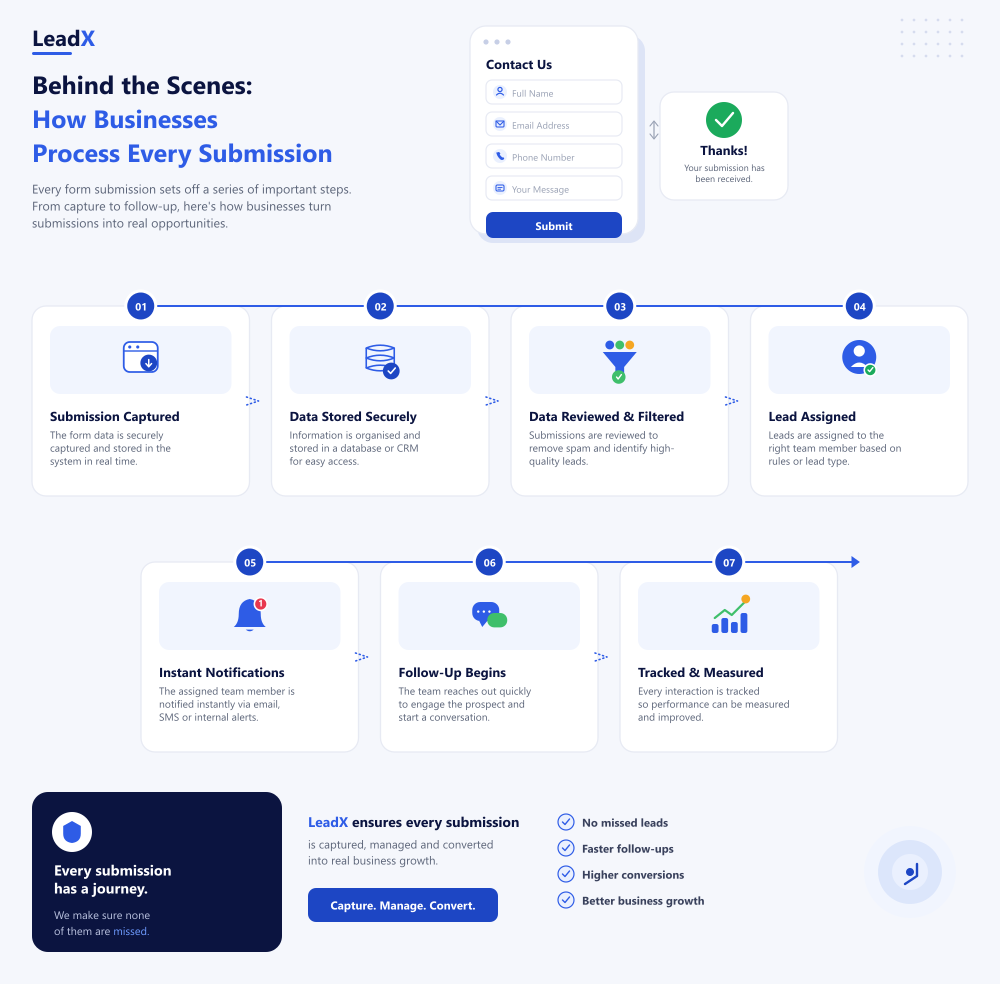
Lead routing automation directs enquiries to appropriate departments automatically. Sales enquiries reach sales representatives immediately. Support requests move directly to customer service. Technical questions reach specialist teams without delays. Automated routing eliminates unnecessary forwarding and confusion.
Form data integration keeps customer information synchronised across connected systems. Submitted details update CRM records automatically. Existing profiles remain accurate and organised. Teams access reliable information without duplicate records. Shared data improves collaboration across every department.
Businesses typically automate these tasks:
- Assign enquiries automatically.
- Route submissions by department.
- Update CRM records instantly.
- Notify responsible team members.
- Track every submission.
Automated notification systems also improve internal communication. Email alerts inform responsible employees immediately. Team collaboration tools deliver instant updates. Dashboard notifications provide real-time visibility across every enquiry. Faster communication helps teams respond confidently and consistently. Every automated step supports a smoother customer journey and stronger operational performance.
Why Automated Form Follow-Up Matters
Submitting a form begins the customer journey. Quick communication keeps customers engaged and confident. An automated form follow-up removes delays and improves every interaction. Businesses respond faster without increasing manual workloads. Customers receive timely updates and clear expectations throughout the process.
A structured form submission workflow also creates better customer experiences. Every enquiry follows the same reliable process. Teams access information quickly and respond consistently. Automation reduces repetitive administration and improves overall efficiency. Staff spend more time helping customers instead of managing routine tasks.
Timely follow-ups also create stronger conversion opportunities. Customers remain engaged while interest stays high. Consistent communication builds trust and encourages meaningful conversations. Over time, these positive interactions strengthen long-term customer relationships. A reliable workflow helps businesses convert more enquiries into loyal customers.
Common Mistakes That Hurt Your Form Submission Workflow
A well-designed form cannot guarantee great results alone. Poor follow-up processes often reduce valuable opportunities. Small mistakes create delays and frustrate potential customers. Identifying these issues helps businesses improve every stage of their workflow.
Avoid these common mistakes:
- Delaying responses after receiving new enquiries.
- Forgetting to send confirmation emails.
- Routing enquiries to incorrect departments.
- Entering customer information manually.
- Ignoring CRM integration.
- Losing submissions through poor tracking.
- Skipping automated follow-up after submissions.
Fixing these issues creates a smoother form submission workflow. Businesses respond faster and communicate more consistently. Better processes improve customer experiences and increase conversion opportunities.
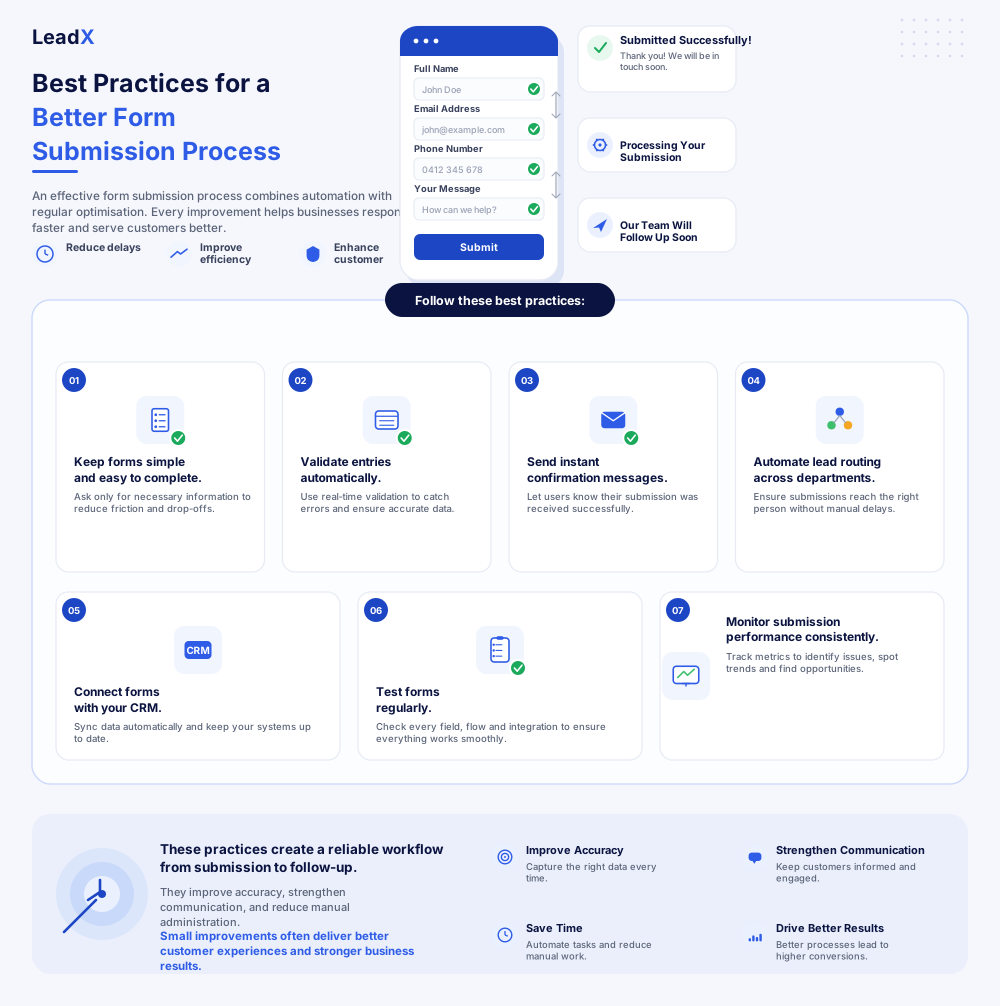
Best Practices for a Better Form Submission Process
An effective form submission process combines automation with regular optimisation. Every improvement helps businesses respond faster and serve customers better. Simple workflows reduce unnecessary delays and improve overall efficiency. Regular reviews also identify issues before they affect customer experiences.
Follow these best practices:
- Keep forms simple and easy to complete.
- Validate entries automatically.
- Send instant confirmation messages.
- Automate lead routing across departments.
- Connect forms with your CRM.
- Test forms regularly.
- Monitor submission performance consistently.
These practices create a reliable workflow from submission to follow-up. They improve accuracy, strengthen communication, and reduce manual administration. Small improvements often deliver better customer experiences and stronger business results.
Conclusion
Every form submission marks the beginning of a customer relationship. How businesses respond shapes the entire experience. A reliable form submission process keeps every stage organised and efficient. Automation removes delays and reduces manual workloads. Faster responses also improve customer confidence and satisfaction. Small workflow improvements create meaningful business benefits over time. Better communication, accurate data, and consistent follow-ups increase conversion opportunities naturally. Reviewing your current process helps identify unnecessary gaps and inefficiencies. Investing in smarter workflows today creates stronger customer relationships tomorrow.
Frequently Asked Questions
The system validates submitted information immediately. It stores the data securely and sends confirmation messages. The enquiry then follows an automated workflow for processing and follow-up.
A confirmation message reassures customers that their submission was successful. It also explains the next steps and expected response times, building confidence immediately.
Lead routing automation sends enquiries to the correct department automatically. Teams respond faster because submissions reach the right people immediately.
Automated form follow-up sends emails, notifications, or reminders after submission. It keeps customers informed while reducing manual administrative work.
CRM integration stores customer information automatically and prevents duplicate records. Teams access accurate information quickly, improving collaboration and customer communication.