 ChatGPT
 Perplexity
 Grok
Grok
 Google AI
Website forms help businesses turn visitors into leads. They create a direct path towards conversion. Visitors can request demos, download resources, or ask questions. Therefore, form placement can strongly influence your results.
Landing page forms and homepage forms serve different purposes. They also attract visitors with different levels of intent. Understanding these differences can improve your form conversion rate. It can also support stronger lead generation.
So, which option converts better for most businesses? The answer depends on several important factors. These include traffic source, visitor intent, and offer relevance. Form optimisation also plays an important role.
What Are Landing Page Forms?
Landing page forms appear on dedicated conversion-focused pages. These pages usually promote one specific offer. The form supports the page’s main purpose.
Businesses often use these forms for targeted campaigns. Common examples include demo requests and free trials. They also include ebook downloads and lead magnets.
Landing page forms work best with focused messaging. The surrounding content supports the same conversion goal. This creates a more consistent visitor experience.
Key Features of Landing Page Forms
Landing page forms focus on one conversion goal. They usually contain fewer distractions and competing links. Their calls to action explain the next step. Businesses can tailor them for specific audiences. This makes them useful for lead generation.
What Are Homepage Forms?
Homepage forms appear on a business’s main website page. They form part of the broader website forms strategy. Unlike landing pages, homepages serve many visitor needs.
Some visitors may want service information. Others may want to contact the sales team. Some visitors may explore the brand before deciding.
Homepage forms must support these different intentions. They should remain easy to find and use. They should also avoid interrupting website navigation.
Common Types of Homepage Forms
Businesses use homepage forms for different purposes. Contact forms capture general questions and sales enquiries. Newsletter forms help build long-term audiences. Demo forms capture product-focused visitors. General enquiry forms provide simple contact options.
Landing Page Forms vs Homepage Forms: Key Differences
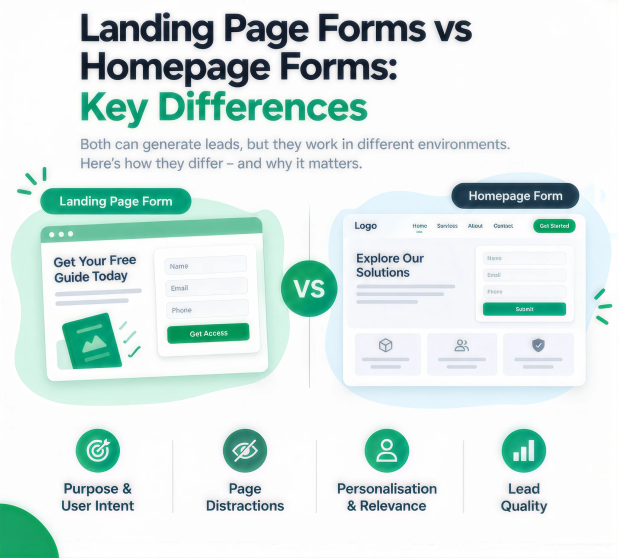
Landing page forms and homepage forms serve different environments. Their differences can affect conversion and lead quality.
Purpose and User Intent
Landing pages usually target visitors with specific interests. Visitors may arrive through advertisements or emails. They often already understand the promoted offer. Homepage visitors usually have broader reasons for visiting. They may still research services or compare solutions.
Page Distractions
Homepages usually contain several navigation elements. Visitors can explore services, products, and resources. Multiple CTAs can also compete for attention. Landing pages usually remove many distractions. This keeps visitors focused on one action.
Personalisation and Relevance
Landing pages make personalised messaging easier. Businesses can create pages for specific campaigns. Their forms can match the promoted offer. Homepage forms must appeal to broader audiences. This makes specific personalisation more difficult.
Lead Quality
Both form types can generate valuable leads. However, visitor intent can differ considerably. Targeted landing pages often attract stronger intent. Homepage visitors may still research their options. Businesses should measure lead quality carefully.
Which Has a Better Form Conversion Rate?
Landing page forms often achieve stronger conversion rates. This happens with highly targeted traffic. The messaging usually matches visitor expectations. The page also supports one conversion goal.
However, homepage forms can perform well too. Their performance depends on traffic and visitor intent. Strong branding can encourage homepage enquiries. Effective form optimisation can also improve results.
Businesses should not assume one option always wins. They should compare actual performance using reliable data.
When Landing Page Forms Convert Better
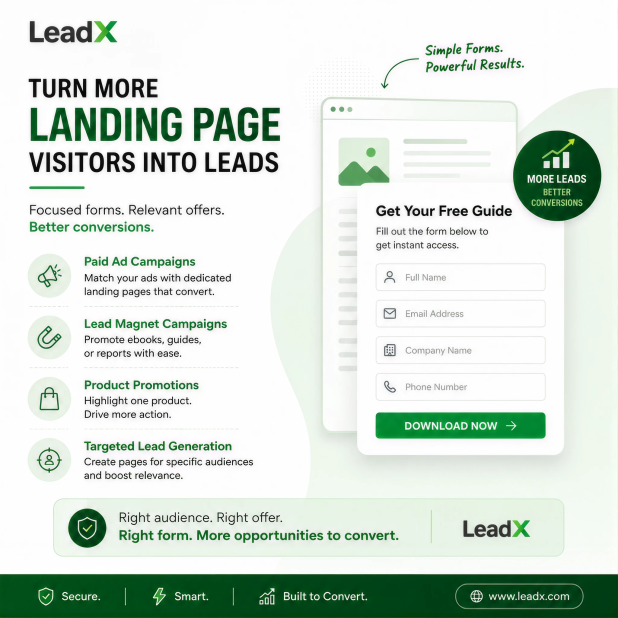
Landing page forms work well for targeted campaigns. Paid advertising provides one common example. Businesses can match ads with dedicated landing pages.
Email campaigns can also benefit from landing pages. Visitors receive a clear path towards the offer. Lead magnet campaigns provide another strong example. Businesses can promote ebooks, guides, or reports.
Product-specific promotions also suit landing page forms. The page can clearly explain one product. It can then encourage visitors to take action.
Targeted lead generation campaigns can use this approach. Businesses can create pages for specific audiences. This improves relevance and conversion opportunities.
When Homepage Forms Convert Better
Homepage forms work well with general website traffic. Visitors may discover businesses through organic search. They may also arrive through direct traffic.
These visitors may explore several available services. A homepage form provides a convenient way to contact. It captures enquiries without requiring extra navigation.
Homepage forms also suit businesses with multiple solutions. Professional service companies can benefit from this approach. Visitors can explore options before submitting enquiries.
How to Create High-Converting Forms
Both form types require careful optimisation. Small changes can reduce friction. They can also encourage more submissions.
Ask Only for Essential Information
Every extra field can increase visitor friction. Ask only for information your team needs. Shorter forms usually create easier experiences. However, keep fields needed for qualification.
Keeping forms short can reduce friction and improve completion rates. The ideal number of fields depends on your audience and offer. For more guidance, read How Many Fields Should Your Lead Form Have?
Match the Form to User Intent
Your form should match visitor expectations. The offer and form should communicate the same value. Avoid complex questions during simple actions. Make the next step clear and easy.
Use Clear Calls to Action
Generic buttons can create uncertainty. Use action-focused language instead. Explain what happens after clicking. Examples include “Request a Demo”. Another option is “Get My Guide”.
Build Trust Around the Form
Visitors may hesitate before sharing information. Trust signals can reduce this hesitation. Add relevant privacy statements near sensitive fields. Testimonials can also increase confidence. Security indicators may provide further reassurance.
Test and Improve Form Performance
Form optimisation should continue after launch. Test different fields, layouts, and CTAs. A/B testing can reveal useful performance differences. Always use visitor data to guide improvements.
For more insights into form psychology, businesses can also explore LeadXForms’ blog article, “The psychology behind high-converting forms”. The article discusses how user psychology can influence form performance.
Form Optimisation: How to Choose the Right Approach
The right approach depends on your campaign objectives. It should also reflect visitor intent. Targeted campaigns usually suit landing pages. Broader traffic may suit homepage forms.
Track several metrics when evaluating performance. These metrics reveal more than submissions alone.
Important metrics include:
- Form completion rate
- Overall conversion rate
- Lead quality
- Form abandonment rate
- Landing page conversion
For example, one form may generate many submissions. However, those leads may have weak buying intent. Another form may generate fewer leads. Yet, those leads may prove more valuable.
Businesses should evaluate quality alongside conversion volume. This creates a more accurate picture of performance.
Businesses can also use tools such as LeadXForms to create forms and manage lead capture. LeadXForms supports form creation, lead collection, qualification, and workflow automation.
Landing Page Forms vs Homepage Forms: Which Should You Use?
Choose landing page forms for focused campaigns. They work well with targeted offers and audiences. Paid advertising campaigns can benefit greatly. Lead magnets also suit this approach.
Choose homepage forms for broader website lead capture. They work well for general enquiries. They also support brand discovery and exploration.
However, businesses do not need one option. Using both can create stronger lead generation opportunities. Each form can serve different visitor intentions.
Conclusion
Landing page forms do not always beat homepage forms. Their performance depends on traffic and visitor intent. Targeted campaigns often favour landing page experiences. Homepage forms can suit broader website traffic.
The strongest strategy focuses on continuous optimisation. Track conversion rates and lead quality regularly. Test different approaches using visitor behaviour. This helps businesses improve website forms over time.
Frequently Asked Questions
Landing page forms often perform better with targeted traffic. They provide focused messaging and fewer distractions. However, homepage forms can still perform well. Results depend on audience, offer, traffic, and optimisation.
There is no universal number for every business. Keep only the fields your business needs. Shorter forms usually reduce completion friction. However, complex offers may require more fields.
A good rate varies across industries and traffic sources. Your offer and audience also affect performance. Compare results against your previous performance. Then test changes for consistent improvements.
Start by matching messaging with visitor expectations. Remove unnecessary distractions from the page. Simplify your form and strengthen the CTA. Add trust signals where appropriate. Then test changes using conversion data.
Yes, many businesses can benefit from using both. Each form can serve different visitor intentions. Homepage forms capture broader website enquiries. Landing page forms support targeted campaigns. Together, they create stronger lead generation opportunities.