 ChatGPT
 Perplexity
 Grok
Grok
 Google AI
Businesses use many digital tools every day. Most work independently. This creates disconnected data and inefficient processes. Teams waste time switching between platforms. Customer information becomes scattered across different systems. Delayed responses and manual work reduce productivity.
CRM integration solves these challenges by connecting your business applications. It creates one reliable source of customer data. Teams access accurate information from one place. Automated workflows reduce repetitive tasks and improve efficiency. Sales, marketing, and support stay aligned throughout the customer journey.
This guide explains what is CRM integration and why it matters. You will discover the benefits of CRM integration and its impact on business growth. You will also learn how CRM integration supports lead generation, workflow automation, and stronger customer relationships.
What Is CRM Integration?
Modern businesses rely on several digital tools to manage sales, marketing, customer support, and operations. However, these systems often work independently, making it difficult to maintain accurate customer information.
CRM integration connects these applications, allowing data to flow automatically between them. This creates a unified view of every customer and helps businesses operate more efficiently.
CRM Integration Explained
What is CRM integration? It is the process of connecting your CRM with other business applications. Instead of storing information separately, connected systems automatically share customer data. This reduces manual work and improves data accuracy.
How CRM Integration Works
CRM integration synchronises data between connected applications in real time. When customer information changes, every connected system updates automatically. It also automates workflows, reducing repetitive tasks and improving productivity.
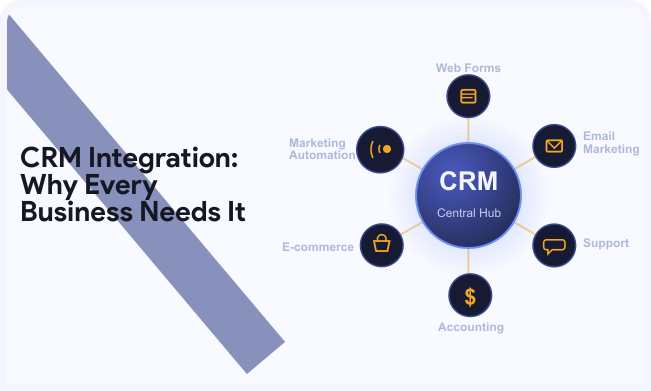
Common Systems Connected to a CRM
Businesses commonly connect their CRM with:
- Website forms
- Email marketing platforms
- Customer support software
- Accounting systems
- E-commerce platforms
- Marketing automation tools
These integrations create a seamless flow of information across every department.
Why CRM Integration Matters for Modern Businesses
Business success depends on accurate data and efficient collaboration. When teams rely on disconnected systems, productivity slows and customer experiences suffer. CRM integration removes these barriers by connecting people, processes, and technology. This helps businesses make faster decisions and deliver consistent customer experiences.
Eliminates Data Silos
CRM integration combines customer information into one central platform. Every department works from the same reliable data, improving accuracy and decision-making.
Improves Team Collaboration
Sales, marketing, and support teams access the same customer records. Better visibility keeps everyone aligned and improves daily efficiency.
Delivers Better Customer Experiences
Connected systems provide instant access to customer information. Teams respond faster, personalise interactions, and build stronger customer relationships.
Benefits of CRM Integration
The benefits of CRM integration go beyond connecting business applications. It improves efficiency, reduces manual work, and helps teams deliver better customer experiences. By keeping customer data synchronised across every system, businesses can make faster decisions and operate more effectively.
Key benefits of CRM integration include:
- Saves Time Through Automation: Automates repetitive tasks such as lead assignment, follow-up emails, and data updates, allowing teams to focus on higher-value work.
- Reduces Manual Data Entry: Synchronises customer information across connected platforms, eliminating duplicate work and reducing human errors.
- Improves Data Accuracy: Maintains consistent and up-to-date customer records across every integrated system for reliable reporting and decision-making.
- Enhances Sales Performance: Gives sales teams instant access to customer histories, helping them personalise conversations and close deals faster.
- Strengthens Marketing Campaigns: Connects customer data with marketing tools to improve audience targeting, campaign performance, and lead nurturing.
- Supports Better Business Decisions: Combines information from multiple business systems into one central view, making it easier to analyse performance and identify growth opportunities.
CRM Integration for Lead Generation
Capturing leads is only the beginning. Turning them into customers requires a fast and organised process. CRM integration for lead generation automatically collects, manages, and tracks every enquiry from one central platform. This reduces manual work, shortens response times, and helps sales teams focus on qualified opportunities.
LeadX Forms helps businesses automate CRM integration through intelligent web forms.
Turn Every Enquiry into a Sales Opportunity
CRM integration automatically captures new leads from your website, landing pages, and marketing campaigns. Every enquiry enters your CRM instantly, ensuring no opportunity is overlooked. Sales teams receive complete customer details without manually transferring information.
Qualified leads can also be routed to the right sales representative based on predefined rules. This speeds up response times and ensures prospects receive timely follow-ups. Automated emails, reminders, and tasks keep leads engaged throughout the buying journey, improving conversion rates.
Web Form CRM Integration
Your website is often the first place potential customers interact with your business. If form submissions require manual processing, valuable enquiries can be delayed or lost. Web form CRM integration removes this risk by sending customer information directly into your CRM.
Key benefits include:
- Automatically creates new customer records.
- Eliminates manual data entry.
- Reduces duplicate or inaccurate information.
- Speeds up sales response times.
- Keeps every enquiry organised.
- Improves the overall customer experience.
By connecting website forms with your CRM, businesses create a smoother lead management process and respond to potential customers much faster. Choosing the right WordPress form builder makes web form CRM integration more effective. Learn more in Best WordPress Form Builder for Lead Generation in 2026
Lead Capture CRM Integration
Customers interact with businesses across multiple channels every day. Managing these enquiries separately creates unnecessary complexity and increases the risk of missed opportunities. Lead capture CRM integration centralises every enquiry, making it easier to manage and convert leads.
Capture Leads from Every Channel
CRM integration automatically collects enquiries from multiple sources, including:
- Landing pages
- Contact forms
- Social media
- Paid advertising
Instead of checking different platforms, teams manage every lead from one central dashboard.
Keep Leads Organised and Respond Faster
Every captured lead receives a complete customer profile within your CRM. Automated workflows can assign sales representatives, schedule follow-up tasks, and send welcome emails immediately. These actions improve response times, strengthen customer engagement, and increase the chances of converting leads into loyal customers.
CRM Workflow Automation
As your business grows, repetitive tasks become more difficult to manage manually. Activities such as assigning leads, sending follow-up emails, and scheduling appointments consume valuable time.
CRM workflow automation eliminates these manual processes by completing routine tasks automatically. This improves efficiency, reduces errors, and helps teams focus on meaningful customer interactions.
What Can Be Automated?
CRM workflow automation can automate a wide range of everyday business activities, including:
- Lead assignment
- Follow-up emails
- Task creation
- Appointment scheduling
- Notifications
- Customer onboarding
Each workflow starts automatically when a specific action occurs, such as a customer submitting a web form or making a purchase. This keeps processes consistent, shortens response times, and ensures every customer receives timely communication without additional manual effort.
Business Benefits of Workflow Automation
CRM workflow automation helps businesses operate more efficiently while improving customer experiences. By automating repetitive processes, teams can focus on strategic work instead of administrative tasks.
Key benefits include:
- Saves time by eliminating repetitive manual tasks.
- Reduces human errors across everyday workflows.
- Improves team productivity and operational efficiency.
- Speeds up customer response and follow-up times.
- Ensures consistent processes across every department.
- Supports business growth without increasing workloads.
These advantages help businesses streamline operations, improve collaboration, and deliver better customer experiences.
CRM Integration for Small Businesses
Small businesses often have limited staff and resources. Managing customer information across disconnected systems can reduce productivity and create unnecessary administrative work. CRM integration for small businesses connects essential tools and automates routine tasks, allowing businesses to operate more efficiently while preparing for future growth.
Some of the biggest benefits include:
- Improves productivity with limited resources.
- Reduces repetitive manual tasks.
- Scales operations without hiring large teams.
- Strengthens customer relationships through personalised communication.
- Organises customer information in one central location.
- Responds to enquiries faster and more consistently.
By connecting business applications, small businesses gain better visibility into their customers, improve daily operations, and create a stronger foundation for sustainable growth.
Best Practices for Successful CRM Integration
Connecting your CRM is only the first step. A successful integration requires careful planning, clean data, and continuous improvement. Following best practices helps businesses maximise efficiency while avoiding common implementation challenges.
Follow these best practices for successful CRM integration:
- Define clear business goals before starting the integration process.
- Choose compatible software that works seamlessly with your existing tools.
- Keep customer data clean by removing duplicate and outdated records.
- Train your team to use integrated systems confidently and consistently.
- Monitor and optimise performance to identify improvements over time.
Reviewing your CRM regularly ensures your integrations continue supporting business goals while adapting to changing operational needs.
Common CRM Integration Mistakes to Avoid
Even the best CRM can underperform if integrations are poorly planned. Avoiding common mistakes helps businesses maintain accurate data, improve user adoption, and maximise their investment.
Avoid these common CRM integration mistakes:
- Integrating too many tools at once, creating unnecessary complexity.
- Ignoring data quality, leading to duplicate or inaccurate records.
- Skipping staff training, reducing productivity and system adoption.
- Failing to review workflows, allowing inefficient processes to continue.
Starting with essential integrations and expanding gradually creates a more reliable, scalable, and effective CRM environment.
Conclusion
CRM integration does more than connect software. It creates a unified business environment where information flows seamlessly between teams and systems. This improves efficiency, reduces manual work, and delivers better customer experiences at every stage of the customer journey.
Whether you run a small business or a growing organisation, CRM integration provides the foundation for smarter operations and sustainable growth. Evaluate your current systems, identify disconnected processes, and implement the right integrations to improve productivity and support long-term success.
Frequently Asked Questions
CRM integration connects your CRM with other business applications, allowing customer information to move automatically between systems. This creates a central source of accurate data and improves operational efficiency.
The main benefits of CRM integration include workflow automation, improved data accuracy, reduced manual data entry, stronger collaboration, faster response times, and better customer experiences.
CRM integration automatically captures leads from multiple channels, qualifies prospects, assigns them to the right sales representatives, and triggers timely follow-up actions to improve conversion rates.
Yes. CRM integration helps small businesses automate routine tasks, improve productivity, reduce administrative work, and scale operations without significantly increasing staffing costs.
A CRM can integrate with website forms, email marketing platforms, accounting software, customer support systems, e-commerce platforms, and marketing automation tools.
CRM workflow automation automates repetitive activities such as lead assignment, follow-up emails, task creation, appointment scheduling, notifications, and customer onboarding. This reduces manual effort, improves efficiency, and allows teams to focus on higher-value work.