 ChatGPT
 Perplexity
 Grok
 Google AI
Choosing between forms and chatbots can feel difficult. Both tools capture information from website visitors. However, they create different user experiences. Forms offer structure and straightforward information collection. Chatbots create interactive conversations around visitor needs. Your goals should guide your choice.
The wrong tool can create unnecessary friction. Visitors may abandon confusing or lengthy experiences. That can reduce enquiries and valuable sales opportunities. Understanding both options makes your decision easier. You can then match tools with visitor expectations.
What Are Web Forms?
Web forms collect visitor information through structured fields. Visitors enter details before submitting their enquiry. Common examples include contact and enquiry forms. Businesses also use forms for bookings and registrations. Forms provide a familiar experience for most website visitors.
Well-designed lead capture forms keep information organised. They also keep data consistent across every submission. Businesses can request specific information during conversion. Conditional logic can also reveal relevant questions. LeadX Forms provides tools for creating website forms. LeadX Forms
What Are Website Chatbots?
Website chatbots communicate with visitors through conversational interfaces. They can answer questions and collect visitor information. Some chatbots use artificial intelligence during conversations. Others follow predefined questions and response paths.
Chatbots can create more interactive website experiences. They can guide visitors towards suitable actions. They can also qualify visitors during conversations. However, their value depends on conversation quality. Poorly designed chatbots can quickly create frustration.

Web Forms vs Chatbots: Key Differences
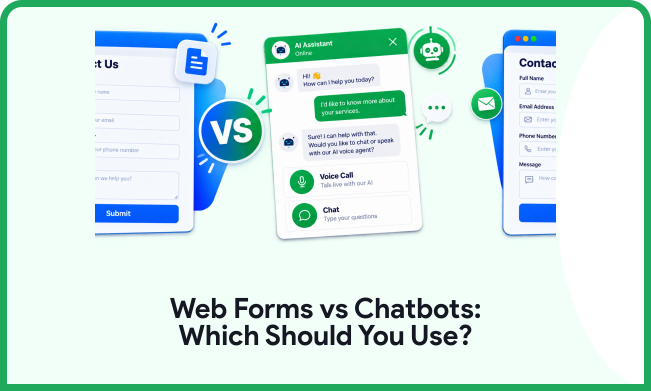
Web forms and chatbots approach lead capture differently. Forms use structured fields and direct submissions. Chatbots use conversations and interactive prompts instead. Neither approach suits every website or audience. Consider several factors before choosing your approach.
User Experience
Forms give visitors a familiar completion process. Users can quickly scan fields before responding. This suits visitors with clear intentions and needs. Chatbots guide visitors through questions sequentially. This can feel more interactive and personal. However, lengthy conversations may frustrate some visitors.
Lead Qualification
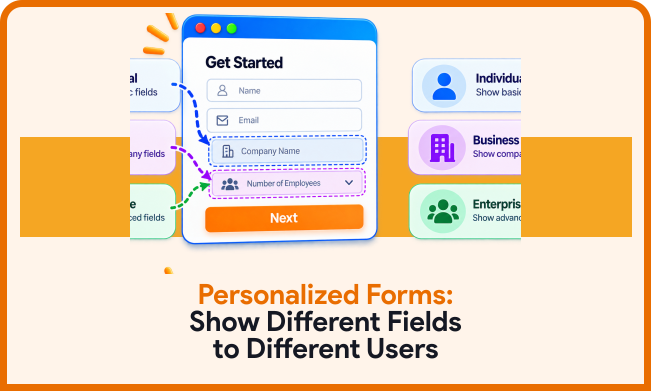
Forms can collect specific information efficiently. Conditional fields can reveal relevant questions when needed. This keeps the experience focused for different visitors. Chatbots can qualify leads through guided conversations. They can ask follow-up questions based on responses. This may provide richer context for sales teams.
Speed and Convenience
Forms can provide fast paths towards conversion. Visitors can complete simple forms within seconds. This works well for straightforward enquiries. Chatbots may require several conversational steps. Those steps can help with complex decisions. Simple enquiries may not need additional conversations.
Data Collection
Forms provide structured information through defined fields. This makes submitted information easier to organise. Businesses can standardise important customer details. Chatbots collect information through conversational interactions. Natural responses can provide useful customer context. However, organising conversational data may require processing.
When Should You Use Web Forms?
Web forms suit visitors with clear conversion intentions. They work well for straightforward lead generation journeys. Contact forms can capture basic information quickly. Quote forms can collect project details efficiently. Booking forms can also gather required information directly.
Forms suit businesses needing structured customer information. They can also support different qualification requirements. Conditional logic can make longer forms more relevant. Conversational forms provide another useful option for businesses. Conversational Forms: The New Way to Collect Leads
Simple Contact Enquiries
Simple enquiries rarely require lengthy conversations. A short form can capture essential contact information. Visitors can submit their enquiry in a few clicks. This reduces unnecessary interaction during conversion. Clear fields also explain what you need immediately. Businesses receive consistent information from every submission.
Detailed Qualification
Some businesses need more information before follow-up. Conditional logic can make these forms more relevant. Visitors see only questions that match their previous responses. This prevents irrelevant questions and reduces friction. Better structure can also improve information quality. Businesses can gather useful context without excessive complexity.
When Should You Use Chatbots?
Chatbots suit websites with frequent visitor questions. They can provide guidance before requesting contact details. This makes them useful for complex customer journeys. Chatbots can also support visitors outside business hours. However, businesses should clearly define their chatbot’s purpose.
Complex Customer Journeys
Some visitors need guidance before taking action. A chatbot can ask questions during that process. Each response can shape the next step in the conversation. This can reduce uncertainty during decision-making. It can also reveal customer requirements more naturally. However, conversations should remain focused and purposeful.
Immediate Visitor Assistance
Visitors often need answers before submitting forms. Chatbots can address common questions immediately. They can explain services, processes, or basic requirements. This can help visitors continue their journey on the website. Automated responses should remain clear and relevant. Poor answers can quickly reduce visitor trust.
Conversational AI vs Forms: What Changes?
Conversational AI vs forms involves different interaction models. Forms organise information through predefined fields and structures. Conversational AI responds through dynamic dialogue and prompts. The distinction becomes smaller with modern form technology.
AI-powered forms can combine both approaches effectively. They can adapt questions according to visitor responses. They can also automatically remove unnecessary questions. This creates a more relevant information-gathering experience. AI-Powered Forms: The Future of Customer Data Collection
AI-powered forms can also support automated qualification. They can organise submitted information for sales teams. Businesses can therefore improve both collection and follow-up. However, automation should still serve user needs.

How Form Design Affects Conversions
Your form design can influence how visitors complete it. Unnecessary fields can create friction during completion. Confusing layouts can also discourage visitors from submitting. Every field should therefore have a clear purpose. Businesses should review their forms regularly.
Mobile usability also deserves careful attention. Many visitors complete forms using mobile devices. Small fields can make completion unnecessarily difficult. Clear labels can reduce confusion during submission. Strong design can support a smoother conversion experience. 15 Form Design Best Practices That Increase Conversions
What About Form Conversion Rate?
Form conversion rate measures completed submissions against visitors. It helps businesses understand form performance. However, conversion rate alone cannot explain everything. Businesses should also examine abandonment and lead quality. A shorter form may generate more submissions. Yet those leads may not always meet requirements.
Businesses should consider conversion alongside lead quality. Relevant questions can improve qualification without adding unnecessary friction. Conditional logic can also streamline complex forms. Testing different layouts can reveal visitor preferences. This creates more useful insights for future improvements.
How To Choose Between Forms And Chatbots
Start by identifying your primary conversion goal. Then consider visitor intent and journey complexity. Simple journeys usually suit direct form interactions. Complex journeys may benefit from conversational guidance.
Consider how much information visitors must provide. Also consider how quickly teams need that information. Your existing lead generation tools also matter. Integration can affect how teams manage captured leads. Choose an approach that fits your workflow.
Can Forms And Chatbots Work Together?
Forms and chatbots do not always compete directly. Businesses can use both across different website journeys. Each tool can serve a specific conversion purpose. A chatbot can answer questions before users complete a form. A form can then capture structured contact information.
This approach combines guidance with efficient data collection. Businesses can also use conversational forms instead. These forms provide interaction without traditional chatbot experiences. The right approach depends on audience expectations. Your conversion goal should remain the main consideration.
Conclusion
Web forms and chatbots serve different purposes. Forms provide structure, speed, and predictable information collection. Chatbots provide guidance and conversational engagement. Modern tools can combine features from both approaches. Consider your audience, goals, and customer journey. Then choose the simplest suitable experience.
Frequently Asked Questions
Neither option works best for every website. Forms suit direct and structured lead capture. Chatbots suit guided customer journeys and questions.
Chatbots can support lead generation through conversations. Results depend on design and visitor intent. Clear conversations can encourage visitors to continue.
Yes, smart forms can support automated qualification. Conditional questions can collect relevant information. AI can also help organise submitted responses.
Several factors can influence form conversion rates. Form length and clarity can affect completion. Mobile usability can also influence visitor behaviour.
Businesses can combine both tools when appropriate. Chatbots can guide users before they submit a form. Forms can then capture structured customer information.