
 ChatGPT
 Perplexity
 Grok
Grok
 Google AI
Many businesses struggle to convert website visitors into valuable business opportunities daily. Many visitors leave without submitting forms or requesting helpful information. Lost opportunities reduce revenue and limit long-term business growth significantly.
Poor forms often confuse visitors and quickly reduce valuable website conversions. Many websites collect information without supporting effective lead qualification or marketing.
Understanding contact forms vs. lead capture forms helps businesses choose suitable solutions. Both forms collect information, yet each serves different business goals effectively.
This guide explains their differences using practical examples and simple language. You will learn when each form delivers better business results. You will also discover strategies for improving website conversions and sustainable growth.
Why Choosing the Right Form Matters
Choosing the right form improves every customer interaction across your website. It matches visitor intentions and increases website conversions more consistently.
Well-designed forms improve customer data collection and support better business decisions. They also strengthen lead qualification before sales conversations begin successfully.
The right form creates better customer experiences and encourages meaningful engagement naturally. Strong forms support sustainable business growth through consistent customer interactions.
Using the wrong form creates unnecessary friction and quickly reduces valuable opportunities. Selecting the correct form helps businesses achieve specific marketing and communication goals.
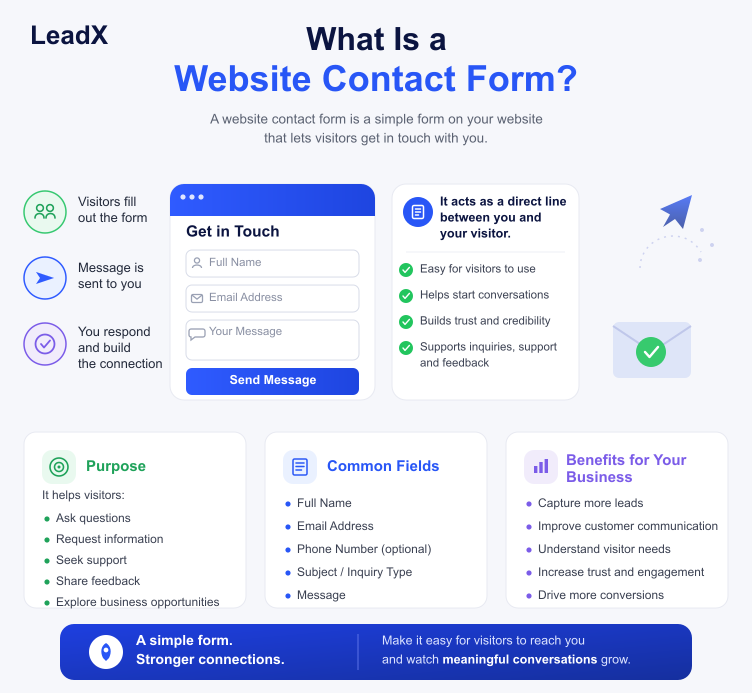
What Is a Website Contact Form?
A website contact form helps visitors communicate with businesses quickly and conveniently. It provides a simple way to send questions, requests, or feedback online.
Visitors complete the form instead of contacting businesses through multiple channels. Businesses receive organised enquiries and respond more efficiently. A well-designed website contact form improves communication and creates a professional first impression.
Purpose of a Website Contact Form
A website contact form supports direct communication between businesses and website visitors. It helps visitors request information, book services, or ask important questions. Businesses receive organised enquiries through one convenient communication channel.
Typical Form Fields
Most contact forms include only essential form fields for quick completion. Common fields include:
- Name
- Email address
- Phone number
- Message
- Enquiry type (optional)
These details help businesses understand enquiries before responding appropriately.
Benefits and Limitations
Benefits
A website contact form improves communication and simplifies enquiry management daily. It provides visitors with an easy way to make contact. Businesses also organise contact enquiries more efficiently.
Limitations
Contact forms focus on communication rather than lead-generating activities. They collect limited customer data for future marketing campaigns. They also offer limited lead qualification without additional marketing tools.
Many service-based businesses rely on contact forms for everyday customer communication. These forms simplify enquiries without creating unnecessary barriers for interested visitors.
Businesses should keep contact forms clear, simple, and easy to complete. A straightforward design encourages more enquiries and consistently improves visitor satisfaction.
What Is a Lead Capture Form?
A lead capture form effectively collects customer data for future marketing opportunities. It encourages visitors to exchange information for valuable business resources.
Purpose of a Lead Capture Form
A lead capture form helps businesses generate leads through targeted offers. It collects visitor details before nurturing potential customers over time. This approach supports stronger marketing campaigns and future business growth.
Why Fewer Form Fields Improve Conversions
Short forms require less effort from website visitors during completion. Fewer form fields reduce friction and encourage more completed submissions. Simple forms often improve website conversions and overall user experiences.
Common Lead Capture Form Examples
Businesses commonly use lead capture forms for valuable marketing offers, including:
- Newsletter subscriptions
- Free consultations
- Ebook downloads
- Webinar registrations
- Product demonstrations
These offers encourage visitors to share information with greater confidence.
Businesses often connect lead capture forms with CRM integration automatically. This process stores information and supports ongoing lead nurturing activities.
Successful lead generation forms balance simplicity with careful collection of valuable customer information. Collecting only essential details improves trust and increases submission rates naturally.
Contact Forms vs Lead Capture Forms: Key Differences
Although both forms collect information, they achieve different business objectives successfully. Understanding these differences helps businesses choose suitable solutions confidently.
| Feature | Website Contact Form | Lead Capture Form |
| Purpose | Supports direct communication | Generates qualified leads |
| User Intent | Contact a business | Receive valuable content or offers |
| Form Fields | Basic contact information | Essential marketing information |
| Customer Data Collection | Limited | More strategic |
| Lead Qualification | Minimal | Stronger qualification |
| CRM Integration | Optional | Commonly integrated |
| Lead Nurturing | Rarely supported | Supports ongoing marketing |
| Website Conversions | Encourages enquiries | Focuses on lead generation |
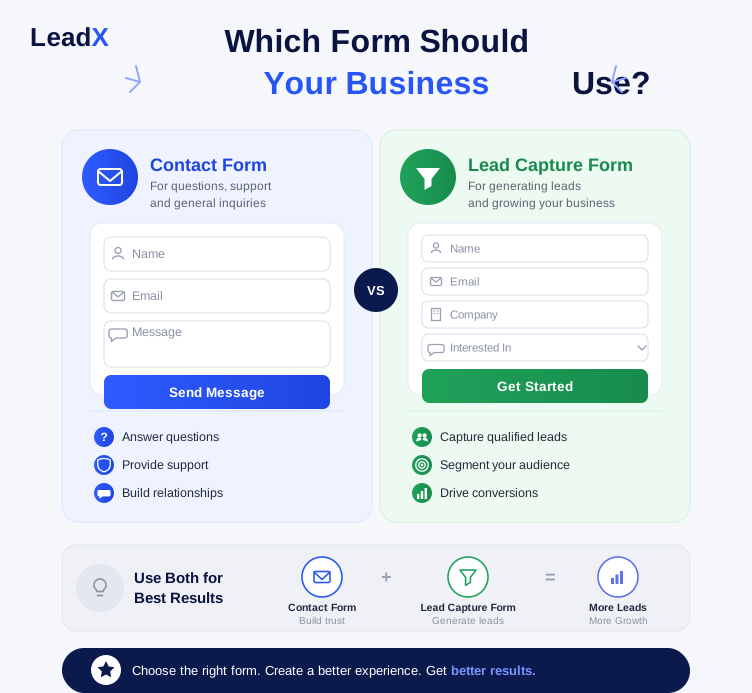
A website contact form supports conversations with interested customers immediately. A lead capture form builds relationships before encouraging future purchasing decisions.
Choosing between a contact form vs lead generation form depends entirely on objectives. Many businesses achieve better results by using both forms strategically.
Which Form Should Your Business Use?
Choosing the right form depends on your business goals and visitor intentions. Each form supports different outcomes and improves specific customer interactions effectively.
No single form suits every business or marketing strategy perfectly. Understanding visitor needs helps businesses select the most effective solution confidently.
Use a Website Contact Form When
A website contact form suits businesses needing direct customer communication regularly. It works best for:
- Customer support
- Quote requests
- General enquiries
- Appointment bookings
- Service enquiries
These forms encourage quick communication without collecting unnecessary customer information.
Use a Lead Capture Form When
A lead capture form supports businesses focused on long-term marketing success. It works best for:
- Growing an email list
- Offering free resources
- Booking consultations
- Generating qualified leads
- Promoting special offers
These forms collect customer data for future lead nurturing and follow-up.
Using Both Forms Together
Many businesses achieve better results by using both forms strategically. Contact forms handle communication, while lead capture forms generate marketing opportunities. This approach improves website conversions and supports different customer journeys effectively.
Best Practices for High-Converting Lead Capture Forms
High-converting lead capture forms should remain simple, clear, and user-friendly. Small improvements often increase website conversions and generate better-qualified leads consistently.
- Keep form fields short and request essential information only.
- Offer valuable incentives matching visitor interests and business goals.
- Write strong, action-focused CTAs encouraging immediate form submissions.
- Optimise every form for mobile devices and faster loading speeds.
- Build trust using privacy statements, secure forms, and social proof.
- Connect forms through CRM integration for seamless customer management.
- Test headlines, CTAs, and form layouts regularly for better performance.
- Remove unnecessary distractions that interrupt the submission process.
- Use clear labels to help visitors complete forms without confusion.
- Follow up quickly to strengthen lead nurturing and customer relationships.
Conclusion
Understanding the difference between contact forms and lead capture forms helps businesses make better marketing decisions. Although both types gather information, they have different objectives.
A contact form on a website allows direct communication when customers make enquiries. A lead capture form aims to produce qualified leads for future marketing. So, choosing the right solution improves the customer experience and increases website conversions.
Many businesses achieve stronger results by using both forms strategically. Each form supports different stages of the customer journey successfully. Review your current forms and identify opportunities for meaningful improvements today. Small changes can increase conversions and significantly strengthen long-term business growth.
Frequently Asked Questions
A website contact form supports direct communication between visitors and businesses. A lead capture form collects customer data for future marketing activities. Both forms collect information, but they achieve different business objectives.
Yes, a website contact form can generate leads from interested visitors. However, it primarily supports communication rather than structured lead generation. A dedicated lead capture form usually delivers better marketing results.
Keep form fields as short as possible for better completion rates. Request only essential information supporting your marketing objectives. Simpler forms usually improve website conversions and visitor experiences.
The answer depends on your business goals and visitor intentions. Lead capture forms usually increase marketing conversions through valuable offers. Contact forms improve communication and encourage genuine customer enquiries.
Many businesses benefit from using both forms across different website pages. Contact forms support communication, while lead capture forms generate qualified leads. Together, they create a stronger customer journey and better marketing outcomes.