 ChatGPT
 Perplexity
 Grok
 Google AI
Choosing the right form solution matters for WordPress websites. Forms collect enquiries, contacts, bookings, and leads. However, different tools support different website requirements. Elementor forms work closely with Elementor website designs. LeadX Forms takes a more lead-focused approach.
Your choice should match your website and business goals. It should also fit your existing workflow. Some teams prioritise simple website integration. Others need stronger lead capture experiences. Understanding both options makes the decision easier.
Elementor Forms vs LeadX Forms: The Main Difference
Elementor forms work within Elementor website-building workflows. Users can create forms while designing website pages. This approach suits businesses already using Elementor. It keeps form creation close to website design. It can also simplify basic form management.
LeadX Forms takes a different approach. It focuses more directly on lead generation needs. Businesses can build forms around conversion objectives. They can also create more focused visitor journeys. The main difference involves the purpose behind each approach.
Building Forms Within WordPress
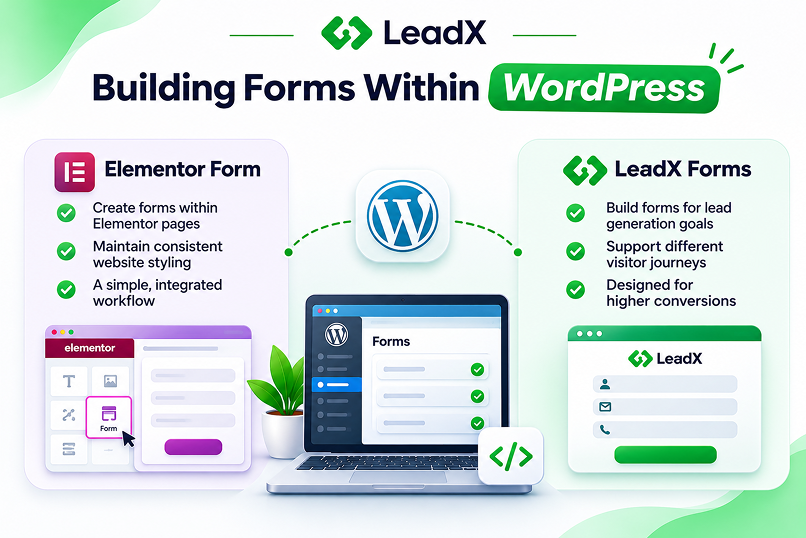
WordPress forms should fit naturally within your website. Businesses need simple ways to create and publish forms. They also need designs matching their existing website. The best option depends on your website setup. Your team’s workflow also affects this decision.
Elementor Form
An Elementor form works within Elementor page-building workflows. Users can create forms while designing website pages. This reduces the need to switch between tools. Businesses can maintain consistent website styling. This makes Elementor useful for integrated website workflows.
LeadX Forms
LeadX Forms focuses on dedicated form creation. Businesses can build forms around lead generation requirements. This allows teams to focus on conversion goals. Forms can support different visitor journeys and information needs. This approach suits businesses that treat forms as lead assets.
Form Design And User Experience
Form design affects how visitors complete website forms. Complicated forms can create unnecessary friction. Clear layouts make it easier to provide information. The surrounding page also influences visitor behaviour. Therefore, form design should support the intended action.
Website-Focused Form Design
Elementor forms can become part of website layouts. This allows forms to sit within designed page sections. Businesses can combine forms with supporting website content. Visitors can see context before completing forms. This approach suits pages where design matters strongly.
Lead-Focused Form Experiences
LeadX Forms approaches forms through lead-capture journeys. Businesses can structure questions around conversion objectives. They can create experiences based on visitor responses. This can make information collection more focused. The approach supports businesses prioritising lead generation.
Lead Capture And Qualification
Lead capture involves collecting useful information from prospects. Basic contact details may not always provide enough context. Businesses may need additional information for qualification. The form should reflect the sales process. Relevant questions can make submissions more useful.
Collecting Lead Information
Elementor forms can collect information through website forms. Businesses can request contact details and other fields. Required fields depend on individual business needs. Shorter forms can suit straightforward enquiries. Detailed forms can support qualification processes.
Structuring Lead Capture
LeadX Forms places lead capture at the centre. Businesses can structure questions around specific objectives. They can request information needed for qualification. This can help teams receive relevant submissions. Focused forms can also create clearer visitor journeys.
15 Form Design Best Practices That Increase Conversions
Conditional Logic And Smarter Forms
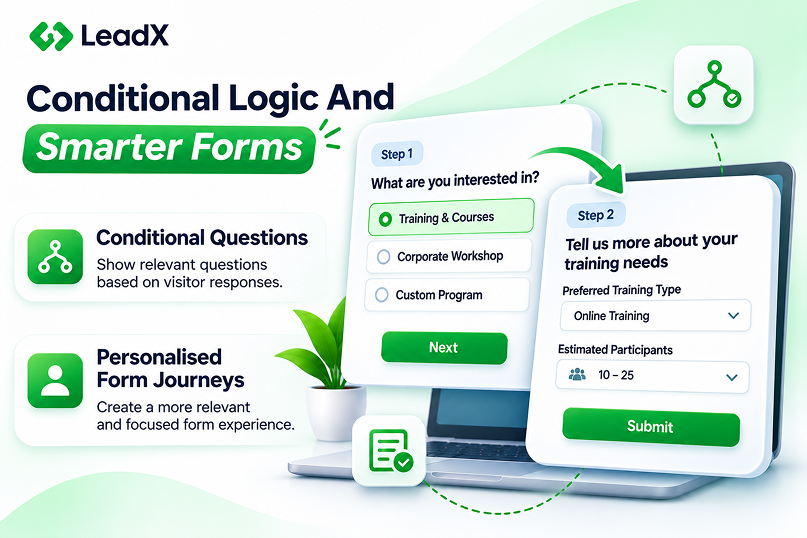
Different visitors often have different requirements. Showing every question can create unnecessary friction. Conditional logic can make forms more relevant. Questions can change according to previous responses. This creates more focused form experiences.
Conditional Questions
Conditional questions appear according to visitor responses. This allows forms to follow different paths. Businesses can ask relevant questions at each stage. Service interests can determine later questions. This approach can reduce unnecessary fields.
Personalised Form Journeys
Personalised journeys can make forms feel more relevant. Visitors can see questions matching previous responses. This can reduce unnecessary interactions during completion. Businesses can also collect targeted information. This approach supports focused lead-capture experiences.
Personalized Forms: Show Different Fields to Different Users
Conversational Forms And Interactive Experiences
Traditional forms usually display multiple fields at once. Conversational forms introduce questions progressively instead. This changes how visitors experience information collection. It can make longer forms feel more manageable. Different businesses may prefer different approaches.
Traditional Form Experience
Elementor forms can support straightforward information collection. Visitors can complete several fields on one form. This approach works well for simple enquiries. It keeps the interaction familiar for visitors. The surrounding page can provide additional information.
Conversational Lead Capture
LeadX Forms supports conversational approaches to lead capture. Questions can appear progressively during the interaction. This creates a more guided visitor experience. Businesses can also use conversations to qualify leads. This approach suits detailed lead-generation journeys.
Conversational Forms: The New Way to Collect Leads
Elementor Form Builder vs LeadX Forms
A form builder should match your team’s workflow. Website-focused teams may value integrated page building. Lead-focused teams may need dedicated capture features. Existing website tools can affect the decision. Businesses should consider their complete form workflow.
Elementor Form Builder
The Elementor form builder fits Elementor-based websites naturally. Users can create forms within their page-building environment. This can simplify website management for existing users. Forms can also match broader page designs. The approach suits businesses prioritising website integration.
LeadX Forms
LeadX Forms focuses specifically on lead generation. Businesses can create forms around conversion objectives. This supports more focused lead capture experiences. Teams can structure forms around acquisition needs. This approach suits businesses that rely on website leads.
Lead Generation And Conversion Goals
Different businesses use forms for different purposes. Some forms collect simple contact enquiries. Others qualify prospects before sales follow-up. Your form structure should match the desired outcome.
- Simple enquiries: Keep questions short and straightforward.
- Lead qualification: Collect information supporting sales decisions.
- Service enquiries: Ask about customer requirements.
- Campaign leads: Build forms around campaign goals.
- Detailed prospects: Gather information needed for follow-up.
Your conversion goal should guide form design. The form should support that goal directly. Unnecessary questions can make completion harder. Relevant questions can improve submission quality.
Which Solution Fits Different Website Needs?
No single solution fits every WordPress website. Businesses have different technical and marketing requirements. Existing website tools can influence the final decision. Your current workflow should also be considered.
An Elementor website may favour an integrated workflow. Lead-focused campaigns may require a different approach. Teams should also consider their lead management process. The form should support the complete visitor journey. This creates a practical basis for comparison.
Making The Right Choice
Start by identifying your primary form requirements. Then consider how visitors should complete forms. Review the information your team needs. Consider how forms fit your existing website. Finally, examine your broader lead generation workflow.
Businesses should compare complete workflows, not features. A useful form solution should support business objectives. It should also create a clear visitor experience. The right choice depends on combined requirements.
LeadX Forms For Lead-Focused Websites
LeadX Forms focuses on modern lead generation requirements. Businesses can create forms around conversion objectives. They can also build focused visitor journeys. This approach supports websites relying on generated leads.
LeadX Forms supports different form experiences. Businesses can use conversational and personalised approaches. These options can create more relevant interactions. They can also support different information requirements.
Conclusion
Elementor forms and LeadX Forms serve different workflows. Elementor focuses closely on website-building integration. LeadX Forms focuses more strongly on lead generation. Your choice should reflect your website requirements. Consider design, capture, qualification, and visitor experience. Then choose the approach that matches your marketing workflow.
Frequently Asked Questions
Yes, Elementor forms can collect visitor information. Businesses can use them for enquiries and contacts. Their suitability depends on specific lead requirements.
Yes, Elementor forms can suit WordPress websites. They work especially well with Elementor-based websites. They can also fit existing page designs.
LeadX Forms is focused on lead generation. Businesses can create forms around conversion objectives. It supports different lead-capture approaches.
Your choice depends on your website requirements. Consider your workflow and lead generation objectives. Then compare both solutions against those needs.
The answer depends on your specific requirements. Elementor supports integrated website form workflows. LeadX Forms focuses more directly on lead generation.