
 ChatGPT
 Perplexity
 Grok
 Google AI
Most teams use forms for basic lead capture. Yet forms can do much more. Many useful features often go overlooked in daily use. These tools can significantly reduce repetitive tasks. They can also improve lead quality and response times.
LeadX Forms combines several smart capabilities within one platform. These features support smoother lead generation workflows. They also reduce manual work across everyday tasks. Here are ten features worth exploring today.
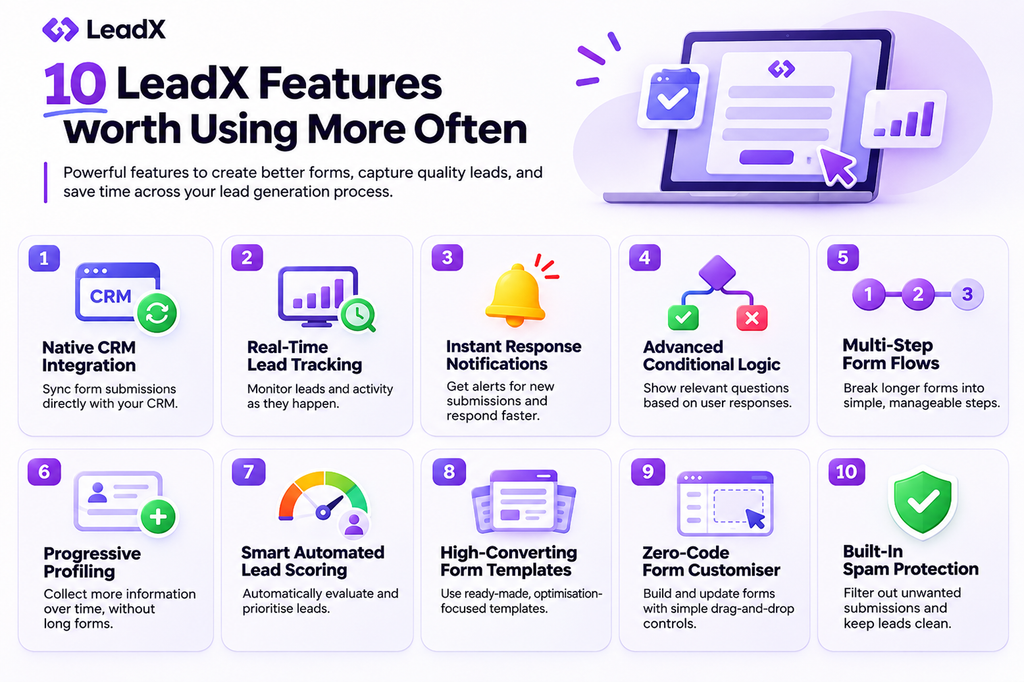
10 LeadX Features Worth Using More Often
LeadX features can support different parts of lead generation. Some improve form creation and visitor experiences. Others simplify lead management and follow-up. Together, they can save valuable working hours.
1. Native CRM Integration
Native CRM integration automatically keeps lead information organised. Form submissions can sync directly with connected systems. This removes repetitive exporting and manual data entry. Sales teams can access current lead information quickly. It also reduces duplicate records and administrative tasks.
2. Real-Time Lead Tracking
Real-time tracking provides visibility after each form submission. Teams can monitor incoming leads as they arrive. They can also review activity throughout customer journeys. The guide Lead Tracking From Form Submission to Sale explores this process. Better visibility reduces manual status checks and delays.
3. Instant Response Notifications
Instant notifications alert teams after new submissions. This feature reduces delays between enquiries and responses. Sales teams can act while interest remains fresh. Managers can also improve accountability across response workflows. Fewer manual checks can save time daily.
4. Advanced Conditional Logic
Conditional logic changes questions based on visitor responses. Visitors only see relevant fields during completion. This keeps forms focused and easier to navigate. Teams also avoid collecting unnecessary information. Form Field Types Explained: A Complete Reference covers different field options. Better forms can reduce friction and improve completion.
5. Multi-Step Form Flows
Multi-step forms divide longer forms into smaller sections. Visitors complete one stage before continuing. This creates a more manageable completion experience. Teams can collect detailed information without one long screen. It also supports more structured data collection.
6. Progressive Profiling
Progressive profiling collects information across multiple interactions. Visitors do not need to answer everything initially. Teams can build richer profiles over time. This approach reduces friction during initial lead capture. It also creates useful information for later engagement.
7. Smart Automated Lead Scoring
Smart lead scoring evaluates prospects automatically. It can prioritise leads using defined qualification criteria. Sales teams can focus on stronger opportunities first. This reduces repetitive manual lead reviews. It also creates a more consistent qualification workflow.
8. High-Converting Form Templates
Templates reduce the time needed to create forms. Teams can start with ready-made conversion-focused layouts. They can then adjust fields for specific campaigns. 15 Form Design Best Practices That Increase Conversions offers useful guidance here. Faster creation helps teams launch forms sooner.
9. Zero-Code Form Customiser
The zero-code customiser removes the need for technical development. Users can adjust forms through simple visual controls. Drag-and-drop editing makes changes easier to manage. Teams can update forms without developer support. This can shorten everyday campaign workflows.
10. Built-In Spam Protection
Spam protection filters unwanted submissions automatically. Cleaner submissions create better-quality lead records. Teams spend less time manually removing fake enquiries. Sales staff can focus on genuine opportunities instead. This also keeps customer data more organised.
How These Features Reduce Daily Work
The biggest benefit comes from combining these features. One feature can remove one repetitive task. Several features can reshape the entire workflow. CRM integration reduces manual data movement. Notifications reduce delays after new submissions. Scoring reduces repeated lead evaluation.
Conditional logic also reduces unnecessary visitor interactions. Templates shorten the form creation process. Spam protection reduces manual data cleaning. These small efficiencies can accumulate throughout each week. Teams gain more time for higher-value activities.
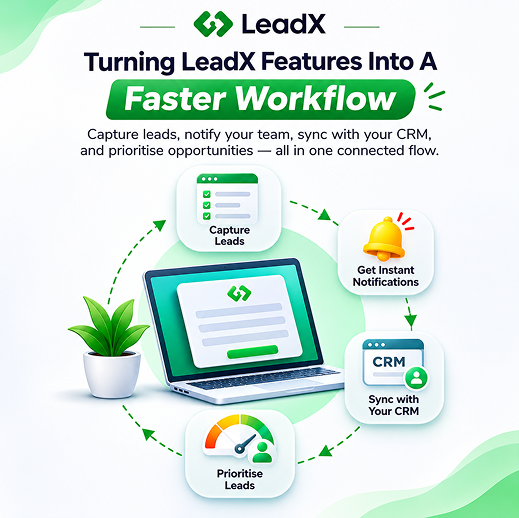
Turning LeadX Features Into A Faster Workflow
LeadX Forms work best when features support each other. A form can capture information through conditional fields. Notifications can alert teams immediately afterwards. CRM integration can automatically organise new leads. Lead scoring can then support prioritisation.
This creates a connected workflow from capture onwards. Teams spend less time moving information manually. They also gain clearer visibility across incoming opportunities. AI-Powered Forms: The Future of Customer Data Collection explains smarter customer data collection. Connected tools make lead generation easier to manage.
Which Features Should You Explore First?
Start with features matching your biggest workflow delays. Manual lead entry suggests CRM integration. Slow responses suggest instant notifications. Poor qualification suggests automated scoring. Long forms may benefit from conditional logic.
Frequent form creation can benefit from templates. Spam-heavy submissions make protection more valuable. Progressive profiling suits longer customer journeys. The right combination depends on your workflow needs. Businesses can explore LeadX Forms for these lead generation capabilities.
Conclusion
LeadX Forms offers more than basic form creation. Its features can remove repetitive work across lead workflows. Automation can improve speed, organisation, and lead visibility. Teams can also create smoother visitor experiences. Exploring these capabilities can unlock more value daily.
Frequently Asked Questions
LeadX Forms features support smarter lead capture workflows. They include automation, tracking, scoring, and personalisation. These tools can reduce repetitive marketing tasks.
Yes, several features automate repetitive lead management tasks. CRM integration reduces manual data transfers. Automated scoring also reduces repeated lead reviews.
Yes, LeadX Forms supports advanced conditional logic. Questions can change based on visitor responses. This creates more relevant form experiences.
Yes, smart automated lead scoring supports qualification. It helps prioritise leads using defined criteria. Sales teams can then focus on stronger opportunities.
Yes, LeadX Forms includes a zero-code customiser. Users can create and adjust forms visually. This reduces dependence on technical development support.